
How to access a drive or a folder in a network through Kali Linux

In this scenario, I have Windows 7 and Kali Linux operating systems. Kali Linux is installed in a virtual server, i.e. vmware player

(A) Now to create a shared drive or folder in Windows 7

  • Click on Start  and then on Computer
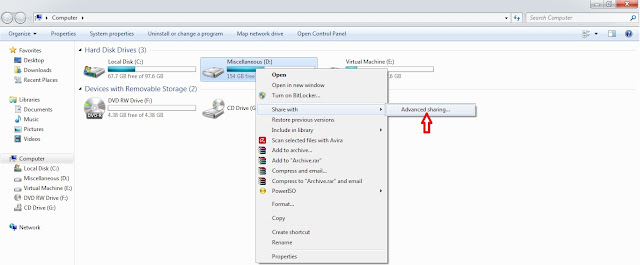
  • Select the drive or the folder you want to share. Right click on it, then click on Share with and then on Advanced sharing...
  • Goto Sharing tab and click on Advanced Sharing...

  • Check on Share this folder, then click on Add button to give Share name and Description of the drive or folder and select the number of users that you allow to share the drive or folder. Then click on permissions and add number of users to whom you grant permission to share your drive or folder in a network. Click on OK to all pop windows that has opened so far. This will take affect and you will see shared drive or folder in the network.
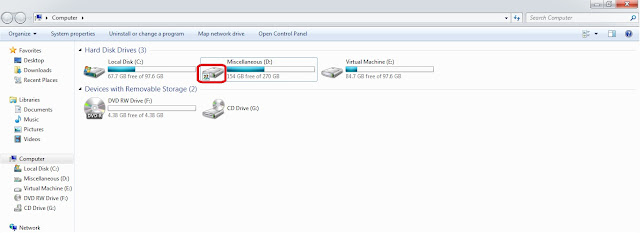
(B) Open vmware player and allow Kali Linux to boot.
  • Login with username and password
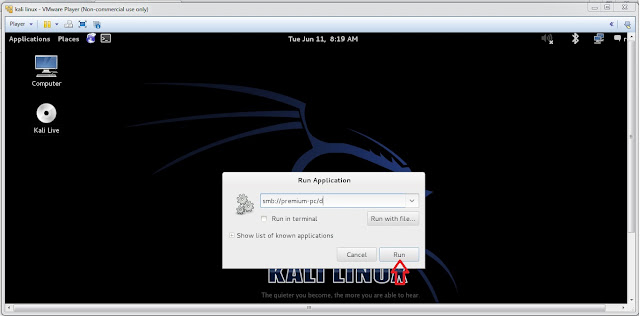
  • Press Alt. + F2 key to bring run dialog box. 
  • type smb://username/shared, where 'username' is the host name and 'shared' is the drive or folder name that has to accessed (smb is a program of samba distribution that allows to maintain interoperability between linux/unix server and windows client), then click on 'Run'.
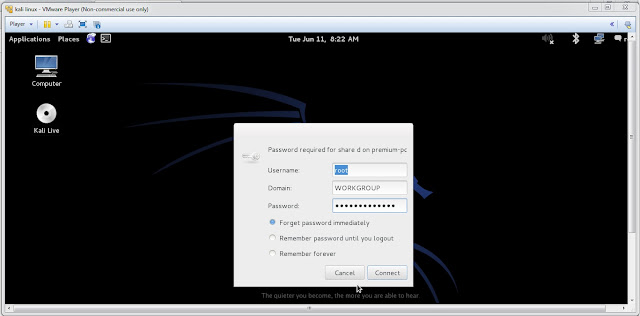
  • type 'username' and 'password' of windows 7 user to access the drive or folder (username and password is the account of the user where the drive or folder has been shared) and click on 'Connect'.
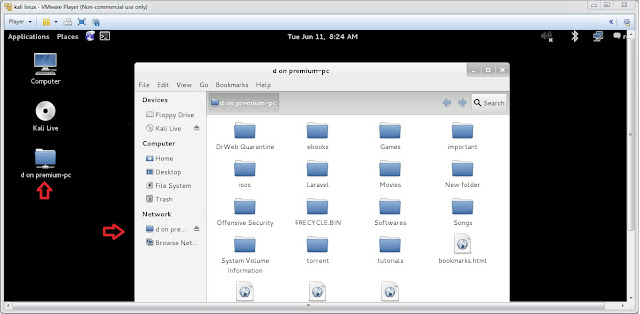
This will mount the shared drive or folder and it will appear on the desktop of Kali Linux.

Comments

Popular posts from this blog

Wordpress hacking - How to install / run wpscan on windows xp / windows 7 / windows 10

HOW TO RUN WPSCAN ON WINDOWS Byrockstardevil Requirements: rubyinstaller Development Kit for rubyinstaller curl DLL for windows : libcurl.dll 1 - install rubyinstaller you must have Ruby 2.2.3 version . download links here : http://rubyinstaller.org/downloads/ for more info : https://github.com/oneclick/rubyinstaller/wiki 2 - install Development Kit for rubyinstaller download link : http://rubyinstaller.org/downloads/ how to install : https://github.com/oneclick/rubyinstaller/wiki/Development-Kit if you face that problem  "unknown encoding name -  (ArgumentError)" just type "chcp 1252" in cmd and hit enter 3 - install libcurl.dll A - Download libcurl.dll from : http://www.confusedbycode.com/curl/ B - copy libcurl.dll copy  libcurl.dll into ruby bin folder or wpscan folder and make sure to add it to your PATH. I also added .DLL to PATHEXT ex : C:\Ruby21-x64\bin\ you can visit : http://www.computerhope.com/issues/ch000549.htm to know to set the p...

Upcoming Book- Kali Linux Revealed: Mastering the Penetration Testing Distribution

More exciting news! In the past year, Kali Linux Official Team has been working internally on an Official Kali Linux book – Kali Linux Revealed: Mastering the Penetration Testing Distribution . This is the first official Kali book from Offsec Press , and is scheduled for release on June 5th, 2017 . Kali Linux Revealed will be available in both hard copy and online formats. Keeping the Kali Linux spirit, the online version of the book will be free of charge, allowing anyone who wishes to hone their skills and improve their knowledge of Kali to do so at no cost. This book, together with our official Kali documentation site will encompass the body of knowledge for the Kali Linux Certified Professional   (KLCP) .

EOF of Kali Linux 1.0

Kali Sana (ver. 2.0) has been out there couple of months ago and the response was great. Kali Moto (ver. 1.0) has been given 2 months of grace period to date the version to 2.0. To upgrade, edit the souces.list file and put the following entries. cat >> EOF < /etc/apt/sources.list deb http://http.kali.org/kali sana main non-free contrib deb http://security.kali.org/kali-security/ sana/updates main contrib non-free EOF Then, run the following command to do upgrade Kali Moto to Kali Sana. apt-get update apt-get dist-upgrade # get a coffee, or 10. reboot