WPScan in Kali Linux

WPScan is a WordPress vulnerability scanner written in ruby, which is capable of detecting common security vulnerabilities as well as listing all plugins used by a website hosting WordPress. WPScan is pre-installed in Kali Linux. 

WPscan is a nice tool if you want to find out how to exploit a WordPress site as it does all of this:
  • Username enumeration (Checks the ‘author’ query-string and the location header).
  • Weak password cracking (This can be multi-threaded and supplied a password list of your choosing).
  • Version enumeration (Finds what version of WordPress they are running by checking meta tags and client side files).
  • Vulneralbility enumeration (Based on what version they are running).
  • Timbthumb file enumeration (Checks for Timthumb exploit).
  • Plugin enumeration (See what plugins they are running).
  • Plugin vulneralbility enumeration (Tells you which, if any, plugins are vulnerable to exploits).
  • Theme enumeration (What theme are they running. Sometimes you can find exploits in the theme).
  • Readme.html enumeration (Sometimes can be useful because you will see what is needed for that theme. Helps you find out what they are running. E.G. “This theme require PHP 5″).
  • Directory listing (Helps footprint the WordPress installation).
To start WPScan, click on Applications--> Kali Linux--> Web Applications--> Web Vulnerability Scanners--> wpscan

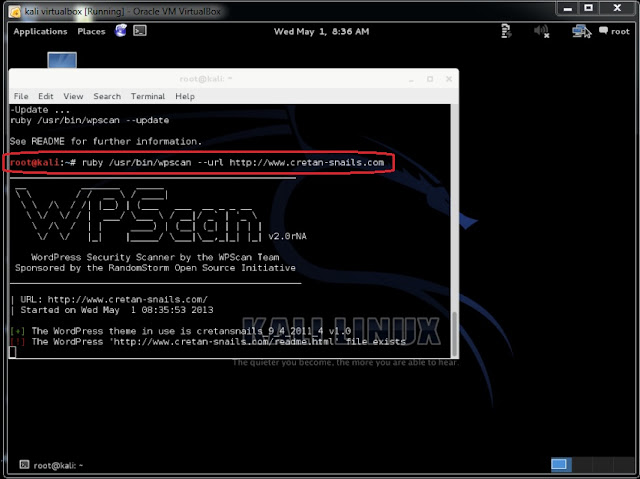
Now, to scan for wordpress plugin to exploit, let pickup any wordpress plugin, ex.: http://www.cretan-snails.com. Type
root@kali:~# ruby /usr/bin/wpscan --url http://www.cretan-snails.com in the root terminal window;

(A)

(B)
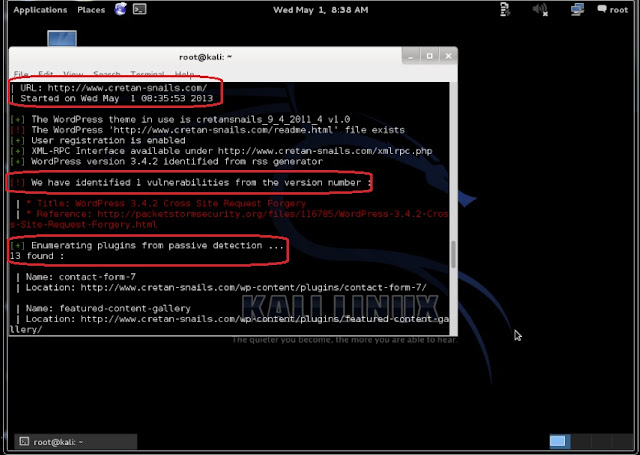
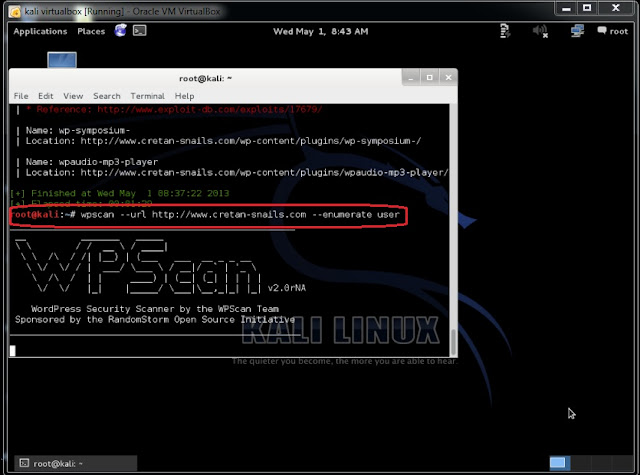
From the above screenshots, we found that there is 1 vulnerability and 13 plug-ins from passive detection. To find Wordpress usernames, type root@kali:~# wpscan --url http://www.cretan-snails.com --enumerate user

(C)

(D)

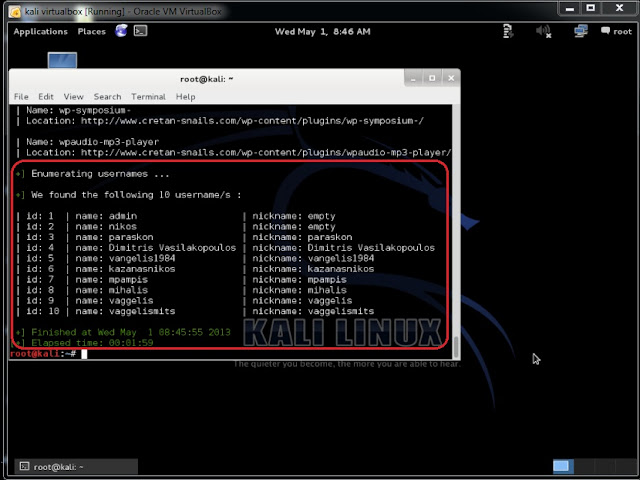
The above screenshot reveals that there 10 Wordpress usernames from http://www.cretan-snails.com

Comments

  1. I just wanted to say this is an elegantly composed article as we have seen here.

    Wordpress Vulnerability Scanner

    ReplyDelete
  2. Wpscan In Kali Linux >>>>> Download Now

    >>>>> Download Full

    Wpscan In Kali Linux >>>>> Download LINK

    >>>>> Download Now

    Wpscan In Kali Linux >>>>> Download Full

    >>>>> Download LINK Yx

    ReplyDelete

Post a Comment

plz add ur comment here

Popular posts from this blog

Wordpress hacking - How to install / run wpscan on windows xp / windows 7 / windows 10

HOW TO RUN WPSCAN ON WINDOWS Byrockstardevil Requirements: rubyinstaller Development Kit for rubyinstaller curl DLL for windows : libcurl.dll 1 - install rubyinstaller you must have Ruby 2.2.3 version . download links here : http://rubyinstaller.org/downloads/ for more info : https://github.com/oneclick/rubyinstaller/wiki 2 - install Development Kit for rubyinstaller download link : http://rubyinstaller.org/downloads/ how to install : https://github.com/oneclick/rubyinstaller/wiki/Development-Kit if you face that problem  "unknown encoding name -  (ArgumentError)" just type "chcp 1252" in cmd and hit enter 3 - install libcurl.dll A - Download libcurl.dll from : http://www.confusedbycode.com/curl/ B - copy libcurl.dll copy  libcurl.dll into ruby bin folder or wpscan folder and make sure to add it to your PATH. I also added .DLL to PATHEXT ex : C:\Ruby21-x64\bin\ you can visit : http://www.computerhope.com/issues/ch000549.htm to know to set the p...

Upcoming Book- Kali Linux Revealed: Mastering the Penetration Testing Distribution

More exciting news! In the past year, Kali Linux Official Team has been working internally on an Official Kali Linux book – Kali Linux Revealed: Mastering the Penetration Testing Distribution . This is the first official Kali book from Offsec Press , and is scheduled for release on June 5th, 2017 . Kali Linux Revealed will be available in both hard copy and online formats. Keeping the Kali Linux spirit, the online version of the book will be free of charge, allowing anyone who wishes to hone their skills and improve their knowledge of Kali to do so at no cost. This book, together with our official Kali documentation site will encompass the body of knowledge for the Kali Linux Certified Professional   (KLCP) .

Check Disk space in Kali Linux

After installing Kali Linux on hard drive or on virtual machine, we may have come across with a warning message of " Low Disk usage ". It happens when we allocate insufficient disk space during partition for kali linux or else when we do a regular "update" and "upgrade" of patches or downloading softwares. Kali Linux comes with a graphical built-in tool, i.e. Disk Usage Analyzer . This tool helps you to check the disk space usage. There are other options too, to check usage as per file system. If you need to check from terminal(for non-gui users), then there are two classic commands available for every linux distros, i.e.  (a) df : Report file system disk space usage (b) du : Estimate file space usage df command is used to check free disk space. You can type df -h or df -k to list free disk space. It displays statistics about the amount of free disk space on the specified file system or on the file system of which file is a part. Values are displayed in...